> ## Documentation Index
> Fetch the complete documentation index at: https://firecrawl-docs-stripe-projects-agent-guidance.mintlify.site/llms.txt
> Use this file to discover all available pages before exploring further.
# Parse
> Turn documents — PDFs, Word, Excel, PowerPoint, and more — into clean markdown, per-page content, layout blocks, and structured JSON
Parse converts documents into clean, LLM-ready data. Upload a file to
[`/parse`](/api-reference/endpoint/parse) — or point [`/scrape`](/features/scrape)
at a public document URL — and get back markdown, per-page content, typed
layout blocks, or structured JSON.
* **Layout-aware**: headings, paragraphs, tables, and formulas assembled in reading order
* **Scans included**: native text extraction with OCR fallback for image-only pages
* **Grounded structure**: typed layout blocks with bounding boxes and character-span links into the markdown (PDFs)
* **Any common format**: PDF, Word, Excel, PowerPoint, OpenDocument, EPUB, CSV, HTML
* **Zero Data Retention** support
## Quickstart
```python Python theme={null}
from firecrawl import Firecrawl
firecrawl = Firecrawl(api_key="fc-YOUR-API-KEY")
doc = firecrawl.parse("./report.pdf")
print(doc.markdown)
```
```javascript Node theme={null}
import { Firecrawl } from "firecrawl";
import fs from "node:fs";
const firecrawl = new Firecrawl({ apiKey: "fc-YOUR-API-KEY" });
const doc = await firecrawl.parse({
data: fs.readFileSync("./report.pdf"),
filename: "report.pdf",
});
console.log(doc.markdown);
```
```bash cURL theme={null}
curl -X POST https://api.firecrawl.dev/v2/parse \
-H 'Authorization: Bearer YOUR_API_KEY' \
-F 'file=@./report.pdf' \
-F 'options={"formats":["markdown"]};type=application/json'
```
Have a **public document URL** instead of a file? [`/scrape`](/features/scrape)
detects the file type and parses it identically — same options, same output:
`firecrawl.scrape("https://example.com/report.pdf")`.
## Response
SDKs return the document object directly. cURL returns the JSON payload.
```json theme={null}
{
"success": true,
"data": {
"markdown": "# Annual Report\n\n...",
"metadata": {
"title": "Annual Report",
"numPages": 42,
"totalPages": 42,
"sourceFile": "report.pdf"
}
}
}
```
`numPages` is the number of pages actually parsed; `totalPages` is the document's
true page count. They match unless `maxPages` truncated the result — e.g. parsing
a 100-page PDF with `maxPages: 10` returns `numPages: 10` and `totalPages: 100`, so
`totalPages > numPages` tells you the output was truncated. `totalPages` is omitted
when the page count can't be determined.
Beyond the document markdown, three outputs cover the cases where a single
markdown string isn't enough: [per-page markdown](#per-page-markdown-pdf) and
[layout blocks](#layout-blocks-pdf) for PDF documents, and
[structured JSON](#structured-json-output) for every format.
## Per-page markdown (PDF)
Set `pages: true` on the [PDF parser](#pdf-options) and the document also
carries a `pages` array with the physical per-page markdown — useful when you
need to know which page content came from, or to process pages independently.
No additional cost.
```python Python theme={null}
from firecrawl import Firecrawl
from firecrawl.v2.types import ScrapeOptions
firecrawl = Firecrawl(api_key="fc-YOUR-API-KEY")
doc = firecrawl.parse(
"./report.pdf",
options=ScrapeOptions(parsers=[{"type": "pdf", "pages": True}]),
)
for page in doc.pages:
print(page.page_number, page.markdown[:80])
```
```js Node theme={null}
import { Firecrawl } from "firecrawl";
import fs from "node:fs";
const firecrawl = new Firecrawl({ apiKey: "fc-YOUR-API-KEY" });
const doc = await firecrawl.parse(
{ data: fs.readFileSync("./report.pdf"), filename: "report.pdf" },
{ parsers: [{ type: "pdf", pages: true }] },
);
for (const page of doc.pages) {
console.log(page.pageNumber, page.markdown.slice(0, 80));
}
```
```bash cURL theme={null}
curl -X POST https://api.firecrawl.dev/v2/parse \
-H 'Authorization: Bearer YOUR_API_KEY' \
-F 'file=@./report.pdf' \
-F 'options={"parsers":[{"type":"pdf","pages":true}]};type=application/json'
```
```json theme={null}
"pages": [
{ "pageNumber": 1, "markdown": "# Annual Report\n\n..." },
{ "pageNumber": 2, "markdown": "..." }
]
```
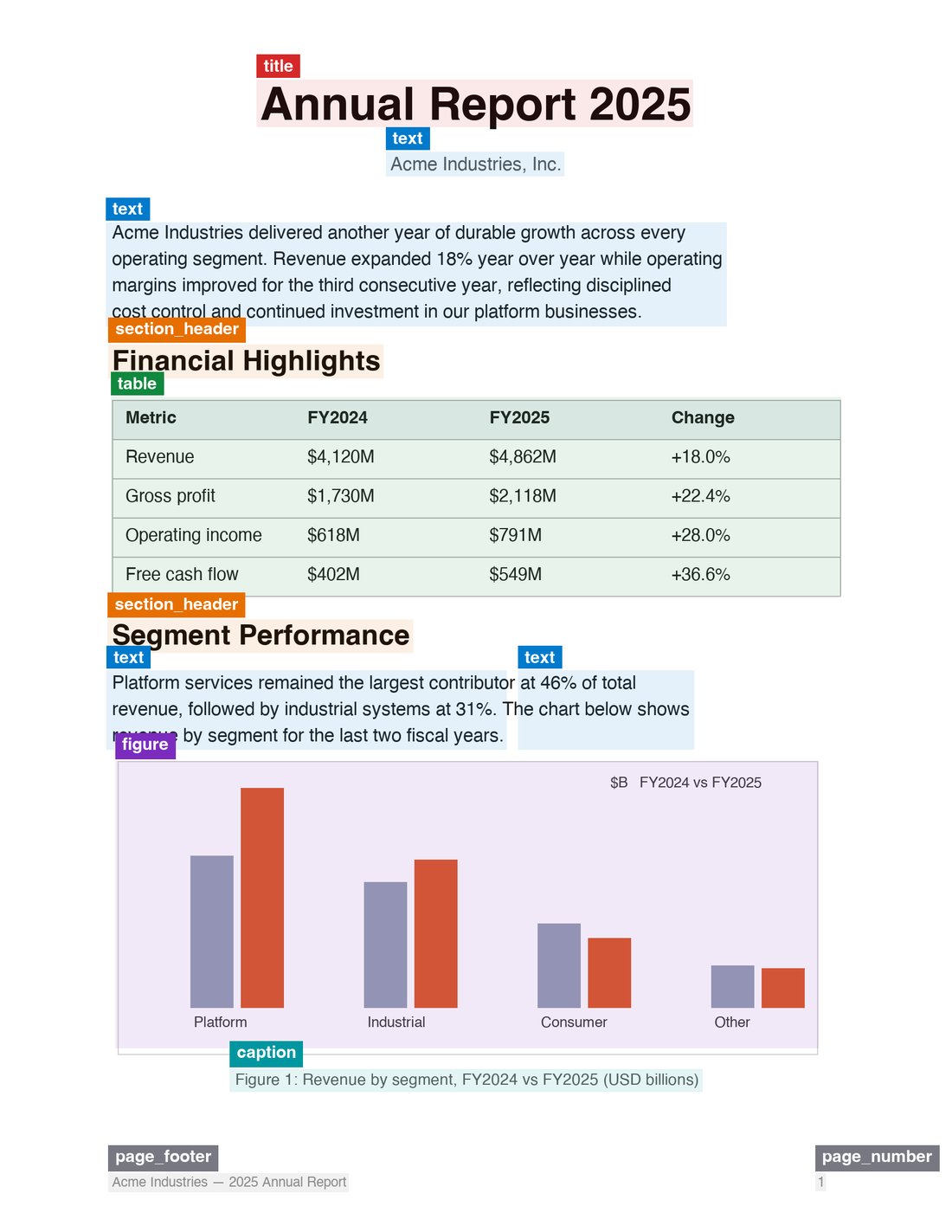
## Layout blocks (PDF)
Set `blocks: true` on the [PDF parser](#pdf-options) and the document also
carries a `blocks` array: for every page, the typed layout blocks the parsing
engine detected, with geometry and provenance. This is the structured
counterpart to the markdown — use it for citation grounding, highlight
overlays, or auditing what a document contains. No additional cost.
 ```python Python theme={null}
from firecrawl import Firecrawl
from firecrawl.v2.types import ScrapeOptions
firecrawl = Firecrawl(api_key="fc-YOUR-API-KEY")
doc = firecrawl.parse(
"./report.pdf",
options=ScrapeOptions(parsers=[{"type": "pdf", "blocks": True}]),
)
for page in doc.blocks:
for block in page.items:
print(page.page_number, block.type, block.bbox)
```
```js Node theme={null}
import { Firecrawl } from "firecrawl";
import fs from "node:fs";
const firecrawl = new Firecrawl({ apiKey: "fc-YOUR-API-KEY" });
const doc = await firecrawl.parse(
{ data: fs.readFileSync("./report.pdf"), filename: "report.pdf" },
{ parsers: [{ type: "pdf", blocks: true }] },
);
for (const page of doc.blocks) {
for (const block of page.items) {
console.log(page.pageNumber, block.type, block.bbox);
}
}
```
```bash cURL theme={null}
curl -X POST https://api.firecrawl.dev/v2/parse \
-H 'Authorization: Bearer YOUR_API_KEY' \
-F 'file=@./report.pdf' \
-F 'options={"parsers":[{"type":"pdf","blocks":true}]};type=application/json'
```
```json theme={null}
"blocks": [
{
"pageNumber": 1,
"width": 1700,
"height": 2200,
"status": "ok",
"items": [
{
"id": "p1.b0",
"type": "title",
"label": "doc_title",
"bbox": [0.118, 0.054, 0.882, 0.092],
"content": "# Annual Report",
"markdownSpan": [0, 15],
"readingOrder": 0,
"source": "native_text",
"confidence": { "layout": 0.97, "ocr": null }
}
]
}
]
```
### Block fields
| Field | Description |
| -------------- | -------------------------------------------------------------------------------------------------------------------------------------------------------------------- |
| `id` | Stable within a response: `p.b`. |
| `type` | Block type: `title`, `section_header`, `text`, `table`, `formula`, `figure`, `caption`, `page_number`, `page_header`, `page_footer`. New types may appear over time. |
| `label` | Raw layout-model label, passthrough for forward compatibility. |
| `bbox` | `[x0, y0, x1, y1]` normalized 0–1 relative to the page. Multiply by `width`/`height` for pixel coordinates. `null` when the page has no known dimensions. |
| `content` | The markdown fragment this block contributed. |
| `markdownSpan` | `[start, end)` character offsets into the document `markdown` covering this block's fragment. `null` when post-processing rewrote the fragment. |
| `readingOrder` | Position in the detected reading order. |
| `source` | Pipeline path that produced the block (e.g. `native_text`, `layout_ocr`, `tsr`, `formula_model`). |
| `confidence` | `layout` detection score (0–1) and `ocr` text confidence where the source provides one; `null` otherwise — never an invented aggregate. |
### Grounding: from an answer back to the page
`markdownSpan` links every block to the exact substring of the markdown it
produced. That makes citation grounding a lookup, not an inference: find the
quoted text in the markdown, find the block whose span covers that offset,
and you have the page number and bounding box — without ever asking a
language model for coordinates.
```python Python theme={null}
def ground(doc, quote: str):
start = doc["markdown"].find(quote)
for page in doc["blocks"]:
for block in page["items"]:
span = block["markdownSpan"]
if span and span[0] <= start < span[1]:
return page["pageNumber"], block["bbox"]
```
```js Node theme={null}
function ground(doc, quote) {
const start = doc.markdown.indexOf(quote);
for (const page of doc.blocks) {
for (const block of page.items) {
const span = block.markdownSpan;
if (span && span[0] <= start && start < span[1]) {
return { pageNumber: page.pageNumber, bbox: block.bbox };
}
}
}
}
```
## Structured JSON output
Pass a JSON schema or prompt to extract structured data directly from the document:
```python Python theme={null}
from firecrawl import Firecrawl
from firecrawl.v2.types import ScrapeOptions
from pydantic import BaseModel
firecrawl = Firecrawl(api_key="fc-YOUR-API-KEY")
class Invoice(BaseModel):
vendor: str
total: float
doc = firecrawl.parse(
"./invoice.pdf",
options=ScrapeOptions(formats=[{
"type": "json",
"schema": Invoice.model_json_schema(),
}]),
)
print(doc.json)
```
```js Node theme={null}
import { Firecrawl } from "firecrawl";
import fs from "node:fs";
import { z } from "zod";
const firecrawl = new Firecrawl({ apiKey: "fc-YOUR-API-KEY" });
const schema = z.object({
vendor: z.string(),
total: z.number(),
});
const doc = await firecrawl.parse(
{ data: fs.readFileSync("./invoice.pdf"), filename: "invoice.pdf" },
{ formats: [{ type: "json", schema }] },
);
console.log(doc.json);
```
```bash cURL theme={null}
curl -X POST https://api.firecrawl.dev/v2/parse \
-H 'Authorization: Bearer YOUR_API_KEY' \
-F 'file=@./invoice.pdf' \
-F 'options={"formats":[{"type":"json","schema":{"type":"object","properties":{"total":{"type":"number"},"vendor":{"type":"string"}}}}]};type=application/json'
```
## PDF options
All PDF behavior is controlled through the `parsers` option — on `/parse` and
`/scrape` alike:
```json theme={null}
{
"parsers": [
{
"type": "pdf",
"mode": "auto",
"maxPages": 100,
"pages": true,
"blocks": true
}
]
}
```
| Property | Type | Default | Description |
| ---------- | --------------------------- | ------------ | ---------------------------------------------------------------------------------------- |
| `type` | `"pdf"` | *(required)* | Parser type. |
| `mode` | `"fast" \| "auto" \| "ocr"` | `"auto"` | Parsing strategy — see below. |
| `maxPages` | `integer` | — | Cap the number of pages to parse. |
| `pages` | `boolean` | `false` | Also return [per-page markdown](#per-page-markdown-pdf). No additional cost. |
| `blocks` | `boolean` | `false` | Also return [layout blocks](#layout-blocks-pdf) with bounding boxes. No additional cost. |
Passing `parsers: []` skips parsing entirely and returns the PDF as base64
(1 credit flat).
### Parsing modes
| Mode | Description |
| ------ | -------------------------------------------------------------------------------------------------------------------------------------------- |
| `auto` | Attempts fast text-based extraction first, falls back to OCR when a page needs it. This is the default. |
| `fast` | Text-based extraction only (embedded text). Fastest option, but fails on scanned or image-only pages rather than silently returning nothing. |
| `ocr` | Forces OCR on every page. Use for scanned documents or when `auto` misclassifies a page. |
## Supported formats
**Extensions:** `.html`, `.htm`, `.xhtml`, `.pdf`, `.docx`, `.doc`, `.docm`, `.odt`, `.ods`, `.odp`, `.rtf`, `.xlsx`, `.xls`, `.xlsm`, `.xlsb`, `.pptx`, `.ppt`, `.pptm`, `.epub`, `.csv`.
See [Document Parsing](/features/document-parsing) for how each format is
converted.
## Request reference
The request is `multipart/form-data` with a required `file` part and an
optional `options` JSON part. `options` accepts a subset of scrape options:
* `formats`: Array of output formats. Defaults to `["markdown"]`. Supported: `markdown`, `html`, `rawHtml`, `links`, `images`, `summary`, and `json` (with a schema or prompt).
* `onlyMainContent`: Only return the main content of the document. Defaults to `true`.
* `includeTags` / `excludeTags`: Tag-level inclusion or exclusion (HTML inputs).
* `redactPII`: Redact personally identifiable information from returned markdown.
* `timeout`: Request timeout in milliseconds. Defaults to `30000`, max `300000`.
* `parsers`: File-parser controls — see [PDF options](#pdf-options).
`/parse` does not support browser-only options like `actions`, `waitFor`, `location`, `mobile`, or change tracking.
**Using Firecrawl through MCP?** Use `firecrawl_parse` for local files. Local MCP can read the file directly when configured with `FIRECRAWL_API_URL`. Remote hosted MCP returns a short-lived upload command first, then parses the returned `uploadRef`. Public document URLs should still use `/scrape`.
## Considerations
* Maximum file size is **50 MB** per request.
* PDF parsing is billed at **1 credit per page**; the `pages` and `blocks` options add no cost.
* Parsing very large or scanned PDFs in `ocr` mode may take longer — increase `timeout` or use `maxPages` to bound the work.
* For batches of files, call `/parse` per file in parallel; there is no batch upload variant.
> Are you an AI agent that needs a Firecrawl API key? See [firecrawl.dev/agent-onboarding/SKILL.md](https://www.firecrawl.dev/agent-onboarding/SKILL.md) for automated onboarding instructions.
```python Python theme={null}
from firecrawl import Firecrawl
from firecrawl.v2.types import ScrapeOptions
firecrawl = Firecrawl(api_key="fc-YOUR-API-KEY")
doc = firecrawl.parse(
"./report.pdf",
options=ScrapeOptions(parsers=[{"type": "pdf", "blocks": True}]),
)
for page in doc.blocks:
for block in page.items:
print(page.page_number, block.type, block.bbox)
```
```js Node theme={null}
import { Firecrawl } from "firecrawl";
import fs from "node:fs";
const firecrawl = new Firecrawl({ apiKey: "fc-YOUR-API-KEY" });
const doc = await firecrawl.parse(
{ data: fs.readFileSync("./report.pdf"), filename: "report.pdf" },
{ parsers: [{ type: "pdf", blocks: true }] },
);
for (const page of doc.blocks) {
for (const block of page.items) {
console.log(page.pageNumber, block.type, block.bbox);
}
}
```
```bash cURL theme={null}
curl -X POST https://api.firecrawl.dev/v2/parse \
-H 'Authorization: Bearer YOUR_API_KEY' \
-F 'file=@./report.pdf' \
-F 'options={"parsers":[{"type":"pdf","blocks":true}]};type=application/json'
```
```json theme={null}
"blocks": [
{
"pageNumber": 1,
"width": 1700,
"height": 2200,
"status": "ok",
"items": [
{
"id": "p1.b0",
"type": "title",
"label": "doc_title",
"bbox": [0.118, 0.054, 0.882, 0.092],
"content": "# Annual Report",
"markdownSpan": [0, 15],
"readingOrder": 0,
"source": "native_text",
"confidence": { "layout": 0.97, "ocr": null }
}
]
}
]
```
### Block fields
| Field | Description |
| -------------- | -------------------------------------------------------------------------------------------------------------------------------------------------------------------- |
| `id` | Stable within a response: `p.b`. |
| `type` | Block type: `title`, `section_header`, `text`, `table`, `formula`, `figure`, `caption`, `page_number`, `page_header`, `page_footer`. New types may appear over time. |
| `label` | Raw layout-model label, passthrough for forward compatibility. |
| `bbox` | `[x0, y0, x1, y1]` normalized 0–1 relative to the page. Multiply by `width`/`height` for pixel coordinates. `null` when the page has no known dimensions. |
| `content` | The markdown fragment this block contributed. |
| `markdownSpan` | `[start, end)` character offsets into the document `markdown` covering this block's fragment. `null` when post-processing rewrote the fragment. |
| `readingOrder` | Position in the detected reading order. |
| `source` | Pipeline path that produced the block (e.g. `native_text`, `layout_ocr`, `tsr`, `formula_model`). |
| `confidence` | `layout` detection score (0–1) and `ocr` text confidence where the source provides one; `null` otherwise — never an invented aggregate. |
### Grounding: from an answer back to the page
`markdownSpan` links every block to the exact substring of the markdown it
produced. That makes citation grounding a lookup, not an inference: find the
quoted text in the markdown, find the block whose span covers that offset,
and you have the page number and bounding box — without ever asking a
language model for coordinates.
```python Python theme={null}
def ground(doc, quote: str):
start = doc["markdown"].find(quote)
for page in doc["blocks"]:
for block in page["items"]:
span = block["markdownSpan"]
if span and span[0] <= start < span[1]:
return page["pageNumber"], block["bbox"]
```
```js Node theme={null}
function ground(doc, quote) {
const start = doc.markdown.indexOf(quote);
for (const page of doc.blocks) {
for (const block of page.items) {
const span = block.markdownSpan;
if (span && span[0] <= start && start < span[1]) {
return { pageNumber: page.pageNumber, bbox: block.bbox };
}
}
}
}
```
## Structured JSON output
Pass a JSON schema or prompt to extract structured data directly from the document:
```python Python theme={null}
from firecrawl import Firecrawl
from firecrawl.v2.types import ScrapeOptions
from pydantic import BaseModel
firecrawl = Firecrawl(api_key="fc-YOUR-API-KEY")
class Invoice(BaseModel):
vendor: str
total: float
doc = firecrawl.parse(
"./invoice.pdf",
options=ScrapeOptions(formats=[{
"type": "json",
"schema": Invoice.model_json_schema(),
}]),
)
print(doc.json)
```
```js Node theme={null}
import { Firecrawl } from "firecrawl";
import fs from "node:fs";
import { z } from "zod";
const firecrawl = new Firecrawl({ apiKey: "fc-YOUR-API-KEY" });
const schema = z.object({
vendor: z.string(),
total: z.number(),
});
const doc = await firecrawl.parse(
{ data: fs.readFileSync("./invoice.pdf"), filename: "invoice.pdf" },
{ formats: [{ type: "json", schema }] },
);
console.log(doc.json);
```
```bash cURL theme={null}
curl -X POST https://api.firecrawl.dev/v2/parse \
-H 'Authorization: Bearer YOUR_API_KEY' \
-F 'file=@./invoice.pdf' \
-F 'options={"formats":[{"type":"json","schema":{"type":"object","properties":{"total":{"type":"number"},"vendor":{"type":"string"}}}}]};type=application/json'
```
## PDF options
All PDF behavior is controlled through the `parsers` option — on `/parse` and
`/scrape` alike:
```json theme={null}
{
"parsers": [
{
"type": "pdf",
"mode": "auto",
"maxPages": 100,
"pages": true,
"blocks": true
}
]
}
```
| Property | Type | Default | Description |
| ---------- | --------------------------- | ------------ | ---------------------------------------------------------------------------------------- |
| `type` | `"pdf"` | *(required)* | Parser type. |
| `mode` | `"fast" \| "auto" \| "ocr"` | `"auto"` | Parsing strategy — see below. |
| `maxPages` | `integer` | — | Cap the number of pages to parse. |
| `pages` | `boolean` | `false` | Also return [per-page markdown](#per-page-markdown-pdf). No additional cost. |
| `blocks` | `boolean` | `false` | Also return [layout blocks](#layout-blocks-pdf) with bounding boxes. No additional cost. |
Passing `parsers: []` skips parsing entirely and returns the PDF as base64
(1 credit flat).
### Parsing modes
| Mode | Description |
| ------ | -------------------------------------------------------------------------------------------------------------------------------------------- |
| `auto` | Attempts fast text-based extraction first, falls back to OCR when a page needs it. This is the default. |
| `fast` | Text-based extraction only (embedded text). Fastest option, but fails on scanned or image-only pages rather than silently returning nothing. |
| `ocr` | Forces OCR on every page. Use for scanned documents or when `auto` misclassifies a page. |
## Supported formats
**Extensions:** `.html`, `.htm`, `.xhtml`, `.pdf`, `.docx`, `.doc`, `.docm`, `.odt`, `.ods`, `.odp`, `.rtf`, `.xlsx`, `.xls`, `.xlsm`, `.xlsb`, `.pptx`, `.ppt`, `.pptm`, `.epub`, `.csv`.
See [Document Parsing](/features/document-parsing) for how each format is
converted.
## Request reference
The request is `multipart/form-data` with a required `file` part and an
optional `options` JSON part. `options` accepts a subset of scrape options:
* `formats`: Array of output formats. Defaults to `["markdown"]`. Supported: `markdown`, `html`, `rawHtml`, `links`, `images`, `summary`, and `json` (with a schema or prompt).
* `onlyMainContent`: Only return the main content of the document. Defaults to `true`.
* `includeTags` / `excludeTags`: Tag-level inclusion or exclusion (HTML inputs).
* `redactPII`: Redact personally identifiable information from returned markdown.
* `timeout`: Request timeout in milliseconds. Defaults to `30000`, max `300000`.
* `parsers`: File-parser controls — see [PDF options](#pdf-options).
`/parse` does not support browser-only options like `actions`, `waitFor`, `location`, `mobile`, or change tracking.
**Using Firecrawl through MCP?** Use `firecrawl_parse` for local files. Local MCP can read the file directly when configured with `FIRECRAWL_API_URL`. Remote hosted MCP returns a short-lived upload command first, then parses the returned `uploadRef`. Public document URLs should still use `/scrape`.
## Considerations
* Maximum file size is **50 MB** per request.
* PDF parsing is billed at **1 credit per page**; the `pages` and `blocks` options add no cost.
* Parsing very large or scanned PDFs in `ocr` mode may take longer — increase `timeout` or use `maxPages` to bound the work.
* For batches of files, call `/parse` per file in parallel; there is no batch upload variant.
> Are you an AI agent that needs a Firecrawl API key? See [firecrawl.dev/agent-onboarding/SKILL.md](https://www.firecrawl.dev/agent-onboarding/SKILL.md) for automated onboarding instructions.