> ## Documentation Index
> Fetch the complete documentation index at: https://firecrawl-docs-stripe-projects-agent-guidance.mintlify.site/llms.txt
> Use this file to discover all available pages before exploring further.
# 解析
> 将 PDF、Word、Excel、PowerPoint 等文档转换为整洁的 Markdown、逐页内容、布局块和结构化 JSON
解析可将文档转换为整洁、可供 LLM 使用的数据。将文件上传至
[`/parse`](/zh/api-reference/endpoint/parse),或使用 [`/scrape`](/zh/features/scrape)
抓取公开文档 URL,即可获取 Markdown、逐页内容、逐页类型化布局块或结构化 JSON。
* **感知布局**:按阅读顺序组织标题、段落、表格和公式
* **支持扫描件**:原生文本提取,并为纯图像页面提供 OCR 回退方案
* **结构可追溯**:逐页类型化布局块,包含边界框以及指向 Markdown 中字符范围的链接 (PDF)
* **支持常见格式**:PDF、Word、Excel、PowerPoint、OpenDocument、EPUB、CSV、HTML
* 支持 **零数据保留**
## 快速入门
```python Python theme={null}
from firecrawl import Firecrawl
firecrawl = Firecrawl(api_key="fc-YOUR-API-KEY")
doc = firecrawl.parse("./report.pdf")
print(doc.markdown)
```
```javascript Node theme={null}
import { Firecrawl } from "firecrawl";
import fs from "node:fs";
const firecrawl = new Firecrawl({ apiKey: "fc-YOUR-API-KEY" });
const doc = await firecrawl.parse({
data: fs.readFileSync("./report.pdf"),
filename: "report.pdf",
});
console.log(doc.markdown);
```
```bash cURL theme={null}
curl -X POST https://api.firecrawl.dev/v2/parse \
-H 'Authorization: Bearer YOUR_API_KEY' \
-F 'file=@./report.pdf' \
-F 'options={"formats":["markdown"]};type=application/json'
```
如果您有**公开文档 URL**而非文件,[`/scrape`](/zh/features/scrape)
会自动检测文件类型并以相同方式解析——选项和输出均相同:
`firecrawl.scrape("https://example.com/report.pdf")`。
## 响应
SDK 直接返回文档对象。cURL 返回 JSON 数据。
```json theme={null}
{
"success": true,
"data": {
"markdown": "# Annual Report\n\n...",
"metadata": {
"title": "Annual Report",
"numPages": 42,
"totalPages": 42,
"sourceFile": "report.pdf"
}
}
}
```
`numPages` 是实际解析的页数;`totalPages` 是文档的
实际总页数。除非 `maxPages` 截断了结果,否则两者会一致——例如,解析
一个 100 页的 PDF 并设置 `maxPages: 10` 时,会返回 `numPages: 10` 和 `totalPages: 100`,因此
`totalPages > numPages` 表示输出已被截断。无法确定页数时,
则会省略 `totalPages`。
除文档 markdown 外,还有三种输出可满足单个
markdown 字符串无法满足的需求:适用于 PDF 文档的[逐页 markdown](#per-page-markdown-pdf)和
[布局块](#layout-blocks-pdf),以及适用于所有格式的
[结构化 JSON](#structured-json-output)。
## 按物理页划分的 Markdown (PDF)
在 [PDF 解析器](#pdf-options)中设置 `pages: true` 后,文档还会包含一个 `pages` 数组,其中包含按实际页面划分的 markdown——当您需要确认内容来自哪一页,或需要独立处理各页面时非常有用。
无需额外成本。
```python Python theme={null}
from firecrawl import Firecrawl
from firecrawl.v2.types import ScrapeOptions
firecrawl = Firecrawl(api_key="fc-YOUR-API-KEY")
doc = firecrawl.parse(
"./report.pdf",
options=ScrapeOptions(parsers=[{"type": "pdf", "pages": True}]),
)
for page in doc.pages:
print(page.page_number, page.markdown[:80])
```
```js Node theme={null}
import { Firecrawl } from "firecrawl";
import fs from "node:fs";
const firecrawl = new Firecrawl({ apiKey: "fc-YOUR-API-KEY" });
const doc = await firecrawl.parse(
{ data: fs.readFileSync("./report.pdf"), filename: "report.pdf" },
{ parsers: [{ type: "pdf", pages: true }] },
);
for (const page of doc.pages) {
console.log(page.pageNumber, page.markdown.slice(0, 80));
}
```
```bash cURL theme={null}
curl -X POST https://api.firecrawl.dev/v2/parse \
-H 'Authorization: Bearer YOUR_API_KEY' \
-F 'file=@./report.pdf' \
-F 'options={"parsers":[{"type":"pdf","pages":true}]};type=application/json'
```
```json theme={null}
"pages": [
{ "pageNumber": 1, "markdown": "# Annual Report\n\n..." },
{ "pageNumber": 2, "markdown": "..." }
]
```
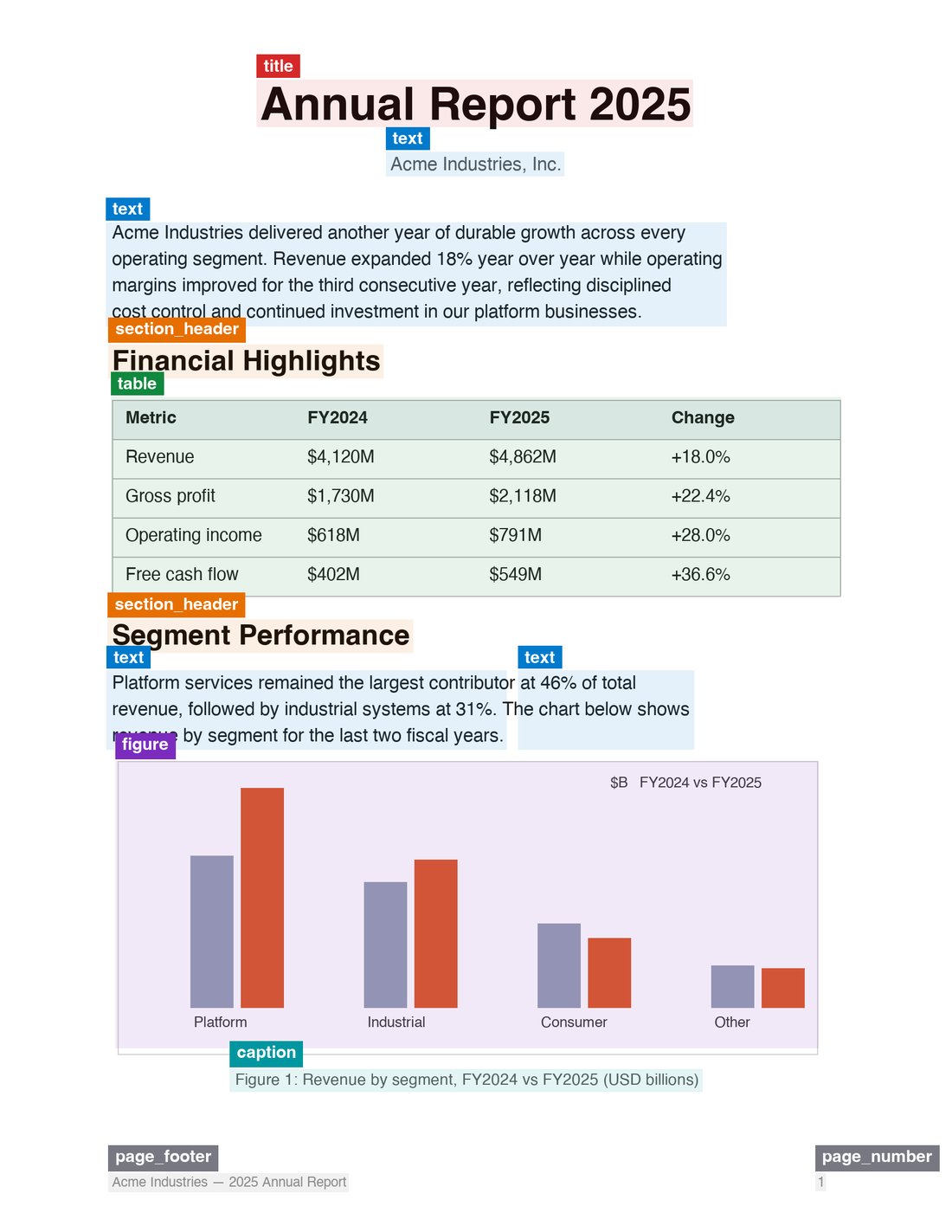
## 布局块 (PDF)
在 [PDF 解析器](#pdf-options)中设置 `blocks: true` 后,文档还会
包含一个 `blocks` 数组:其中按页提供解析引擎检测到的逐页类型化布局块,
以及其几何信息和来源信息。这是 markdown 的结构化对应形式——可用于引用溯源、
高亮叠加层,或审计文档内容。无需额外成本。
 ```python Python theme={null}
from firecrawl import Firecrawl
from firecrawl.v2.types import ScrapeOptions
firecrawl = Firecrawl(api_key="fc-YOUR-API-KEY")
doc = firecrawl.parse(
"./report.pdf",
options=ScrapeOptions(parsers=[{"type": "pdf", "blocks": True}]),
)
for page in doc.blocks:
for block in page.items:
print(page.page_number, block.type, block.bbox)
```
```js Node theme={null}
import { Firecrawl } from "firecrawl";
import fs from "node:fs";
const firecrawl = new Firecrawl({ apiKey: "fc-YOUR-API-KEY" });
const doc = await firecrawl.parse(
{ data: fs.readFileSync("./report.pdf"), filename: "report.pdf" },
{ parsers: [{ type: "pdf", blocks: true }] },
);
for (const page of doc.blocks) {
for (const block of page.items) {
console.log(page.pageNumber, block.type, block.bbox);
}
}
```
```bash cURL theme={null}
curl -X POST https://api.firecrawl.dev/v2/parse \
-H 'Authorization: Bearer YOUR_API_KEY' \
-F 'file=@./report.pdf' \
-F 'options={"parsers":[{"type":"pdf","blocks":true}]};type=application/json'
```
```json theme={null}
"blocks": [
{
"pageNumber": 1,
"width": 1700,
"height": 2200,
"status": "ok",
"items": [
{
"id": "p1.b0",
"type": "title",
"label": "doc_title",
"bbox": [0.118, 0.054, 0.882, 0.092],
"content": "# Annual Report",
"markdownSpan": [0, 15],
"readingOrder": 0,
"source": "native_text",
"confidence": { "layout": 0.97, "ocr": null }
}
]
}
]
```
```python Python theme={null}
from firecrawl import Firecrawl
from firecrawl.v2.types import ScrapeOptions
firecrawl = Firecrawl(api_key="fc-YOUR-API-KEY")
doc = firecrawl.parse(
"./report.pdf",
options=ScrapeOptions(parsers=[{"type": "pdf", "blocks": True}]),
)
for page in doc.blocks:
for block in page.items:
print(page.page_number, block.type, block.bbox)
```
```js Node theme={null}
import { Firecrawl } from "firecrawl";
import fs from "node:fs";
const firecrawl = new Firecrawl({ apiKey: "fc-YOUR-API-KEY" });
const doc = await firecrawl.parse(
{ data: fs.readFileSync("./report.pdf"), filename: "report.pdf" },
{ parsers: [{ type: "pdf", blocks: true }] },
);
for (const page of doc.blocks) {
for (const block of page.items) {
console.log(page.pageNumber, block.type, block.bbox);
}
}
```
```bash cURL theme={null}
curl -X POST https://api.firecrawl.dev/v2/parse \
-H 'Authorization: Bearer YOUR_API_KEY' \
-F 'file=@./report.pdf' \
-F 'options={"parsers":[{"type":"pdf","blocks":true}]};type=application/json'
```
```json theme={null}
"blocks": [
{
"pageNumber": 1,
"width": 1700,
"height": 2200,
"status": "ok",
"items": [
{
"id": "p1.b0",
"type": "title",
"label": "doc_title",
"bbox": [0.118, 0.054, 0.882, 0.092],
"content": "# Annual Report",
"markdownSpan": [0, 15],
"readingOrder": 0,
"source": "native_text",
"confidence": { "layout": 0.97, "ocr": null }
}
]
}
]
```
### 封禁字段
| 字段 | 描述 |
| -------------- | ------------------------------------------------------------------------------------------------------------------------------ |
| `id` | 在同一响应中保持稳定:`p.b`。 |
| `type` | 封禁类型:`title`、`section_header`、`text`、`table`、`formula`、`figure`、`caption`、`page_number`、`page_header`、`page_footer`。未来可能会新增类型。 |
| `label` | 原始布局模型标签,为实现前向兼容而直接透传。 |
| `bbox` | 相对于页面归一化到 0–1 的 `[x0, y0, x1, y1]`。乘以 `width`/`height` 可得到像素坐标。页面尺寸未知时为 `null`。 |
| `content` | 此封禁生成的 Markdown 片段。 |
| `markdownSpan` | 文档 `markdown` 中对应此封禁片段的 `[start, end)` 字符偏移量。后处理重写该片段时为 `null`。 |
| `readingOrder` | 在检测到的阅读顺序中的位置。 |
| `source` | 生成该封禁的流水线路径 (例如 `native_text`、`layout_ocr`、`tsr`、`formula_model`) 。 |
| `confidence` | `layout` 检测分数 (0–1) ,以及来源提供时的 `ocr` 文本置信度;否则为 `null`——绝不使用虚构的聚合值。 |
### 溯源:从答案回溯到页面
`markdownSpan` 将每个封禁关联到其生成的 markdown 中对应的精确子字符串。这让引用溯源成为查找而非推断:在 markdown 中找到引用的文本,再找到 span 覆盖该偏移位置的封禁,即可获得页码和边界框——完全无需向语言模型查询坐标。
```python Python theme={null}
def ground(doc, quote: str):
start = doc["markdown"].find(quote)
for page in doc["blocks"]:
for block in page["items"]:
span = block["markdownSpan"]
if span and span[0] <= start < span[1]:
return page["pageNumber"], block["bbox"]
```
```js Node theme={null}
function ground(doc, quote) {
const start = doc.markdown.indexOf(quote);
for (const page of doc.blocks) {
for (const block of page.items) {
const span = block.markdownSpan;
if (span && span[0] <= start && start < span[1]) {
return { pageNumber: page.pageNumber, bbox: block.bbox };
}
}
}
}
```
## 结构化 JSON 输出
传入 JSON schema 或 prompt,即可直接从文档中提取结构化数据:
```python Python theme={null}
from firecrawl import Firecrawl
from firecrawl.v2.types import ScrapeOptions
from pydantic import BaseModel
firecrawl = Firecrawl(api_key="fc-YOUR-API-KEY")
class Invoice(BaseModel):
vendor: str
total: float
doc = firecrawl.parse(
"./invoice.pdf",
options=ScrapeOptions(formats=[{
"type": "json",
"schema": Invoice.model_json_schema(),
}]),
)
print(doc.json)
```
```js Node theme={null}
import { Firecrawl } from "firecrawl";
import fs from "node:fs";
import { z } from "zod";
const firecrawl = new Firecrawl({ apiKey: "fc-YOUR-API-KEY" });
const schema = z.object({
vendor: z.string(),
total: z.number(),
});
const doc = await firecrawl.parse(
{ data: fs.readFileSync("./invoice.pdf"), filename: "invoice.pdf" },
{ formats: [{ type: "json", schema }] },
);
console.log(doc.json);
```
```bash cURL theme={null}
curl -X POST https://api.firecrawl.dev/v2/parse \
-H 'Authorization: Bearer YOUR_API_KEY' \
-F 'file=@./invoice.pdf' \
-F 'options={"formats":[{"type":"json","schema":{"type":"object","properties":{"total":{"type":"number"},"vendor":{"type":"string"}}}}]};type=application/json'
```
## PDF 选项
所有 PDF 相关行为均通过 `parsers` 选项控制,`/parse` 和
`/scrape` 均适用:
```json theme={null}
{
"parsers": [
{
"type": "pdf",
"mode": "auto",
"maxPages": 100,
"pages": true,
"blocks": true
}
]
}
```
| 属性 | 类型 | 默认值 | 描述 |
| ---------- | --------------------------- | -------- | ---------------------------------------------------- |
| `type` | `"pdf"` | *(必填)* | 解析器类型。 |
| `mode` | `"fast" \| "auto" \| "ocr"` | `"auto"` | 解析策略——详见下文。 |
| `maxPages` | `integer` | — | 限制解析的页数。 |
| `pages` | `boolean` | `false` | 同时返回[按页划分的 Markdown](#per-page-markdown-pdf)。无需额外成本。 |
| `blocks` | `boolean` | `false` | 同时返回带边界框的[布局块](#layout-blocks-pdf)。无需额外成本。 |
传入 `parsers: []` 将完全跳过解析,并以 base64 格式返回 PDF
(固定消耗 1 个额度) 。
### 解析模式
| 模式 | 描述 |
| ------ | ----------------------------------------------------- |
| `auto` | 优先尝试快速的文本提取;当页面需要时回退到 OCR。这是默认值。 |
| `fast` | 仅进行文本提取 (嵌入文本) 。这是最快的选项,但对于扫描页或纯图像页面会直接失败,而不会悄悄返回空结果。 |
| `ocr` | 强制对每一页执行 OCR。适用于扫描文档,或 `auto` 错误分类页面时。 |
## 支持的格式
**扩展名:** `.html`, `.htm`, `.xhtml`, `.pdf`, `.docx`, `.doc`, `.docm`, `.odt`, `.ods`, `.odp`, `.rtf`, `.xlsx`, `.xls`, `.xlsm`, `.xlsb`, `.pptx`, `.ppt`, `.pptm`, `.epub`, `.csv`.
请参见[Document Parsing](/zh/features/document-parsing),了解各格式的
转换方式。
## 请求参考
请求采用 `multipart/form-data`,其中包含必填的 `file` 部分和可选的 `options` JSON 部分。`options` 接受部分 scrape 选项:
* `formats`:输出格式数组。默认值为 `["markdown"]`。支持:`markdown`、`html`、`rawHtml`、`links`、`images`、`summary` 和 `json` (可搭配 schema 或 prompt) 。
* `onlyMainContent`:仅返回文档的主体内容。默认值为 `true`。
* `includeTags` / `excludeTags`:按标签包含或排除内容 (适用于 HTML 输入) 。
* `redactPII`:对返回的 markdown 中的个人身份识别信息进行脱敏处理。
* `timeout`:请求超时时间 (毫秒) 。默认值为 `30000`,最大为 `300000`。
* `parsers`:文件解析器控制选项 — 请参见 [PDF 选项](#pdf-options)。
`/parse` 不支持仅适用于浏览器的选项,例如 `actions`、`waitFor`、`location`、`mobile` 或变更追踪。
**通过 MCP 使用 Firecrawl?** 对于本地文件,请使用 `firecrawl_parse`。配置 `FIRECRAWL_API_URL` 后,本地 MCP 可以直接读取文件。远程托管 MCP 会先返回一个短期有效的上传命令,然后解析返回的 `uploadRef`。公开文档 URL 仍应使用 `/scrape`。
## 注意事项
* 每个请求的最大文件大小为 **50 MB**。
* PDF 解析按**每页 1 个额度**计费;`pages` 和 `blocks` 选项不产生额外成本。
* 在 `ocr` 模式下解析超大 PDF 或扫描版 PDF 可能需要更长时间——请增大 `timeout`,或使用 `maxPages` 来限定处理范围。
* 对于多份文件,请对每个文件并行调用 `/parse`;不支持批量上传。
> 你是需要 Firecrawl API 密钥的 AI 代理吗?请参见 [firecrawl.dev/agent-onboarding/SKILL.md](https://www.firecrawl.dev/agent-onboarding/SKILL.md) 获取自动化引导说明。